
Word Crush - Google Play
You'll be able to see results in few seconds.
Publisher Description
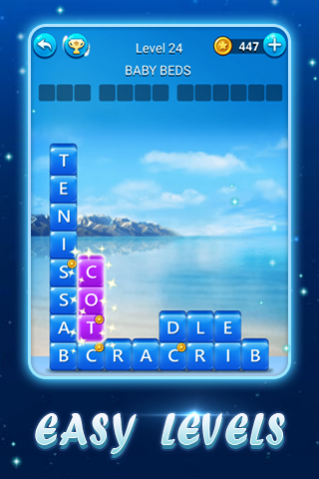
Word Crush is a new creative word search game. It provides you with an easy and simple way to exercise your brain by tapping and swiping on your mobiles' screens.
⭐ HOW TO PLAY? ⭐
- Search words on the letter block square according to the clue(s)
- Swipe letters horizontally or vertically to find and collect words
- Tap the "Search", "Hint" or "Shuffle" buttons when you get stuck
- Unlock beautiful themes by getting enough coins
- Find the "Bonus Words" which are not presented in the answers
FEATURES:
● EACH PUZZLE HAS A CLUE
Use it to find the related words in each puzzle!
● EVOLVING LEVELS
Each puzzle shifts as you find words. Word Search with a twist!
● LOTS OF LEVELS
Play over 3000 levels with more coming soon!
● EARN POWER-UPS
Use the Spyglass, Light Bulb, or shuffle when you get stuck!!
● COLLECT BONUS WORDS
Earn rewards for finding extra words!
● MORE!
Would you like to enjoy brain training with friends or family? Or do you want to be a true teacher of word research someday?
Download it! Start the most addictive word search game for free NOW!
E-MAIL US :liongameplayers@gmail.com
About Word Crush
The company that develops Word Crush is LionGame. The latest version released by its developer is 1.0 .
To install Word Crush on your Android device, just click the green Continue To App button above to start the installation process. The app is listed on our website since 2019-09-09 and was downloaded 0 times. We have already checked if the download link is safe, however for your own protection we recommend that you scan the downloaded app with your antivirus. Your antivirus may detect the Word Crush as malware as malware if the download link to com.wordstacks.wordcrush.en is broken.
How to install Word Crush on your Android device:
- Click on the Continue To App button on our website. This will redirect you to Google Play.
- Once the Word Crush is shown in the Google Play listing of your Android device, you can start its download and installation. Tap on the Install button located below the search bar and to the right of the app icon.
- A pop-up window with the permissions required by Word Crush will be shown. Click on Accept to continue the process.
- Word Crush will be downloaded onto your device, displaying a progress. Once the download completes, the installation will start and you'll get a notification after the installation is finished.
Program Details
System requirements
Download information
Pricing
Version History
version
posted on 2019-09-09
- Optimized some visual graphics & user interfaces
- Bugs fixed to improve overall gaming experience
version
posted on 2019-09-09
- Optimized some visual graphics & user interfaces
- Bugs fixed to improve overall gaming experience
Disclaimer
Official Google Play Link
We do not host Word Crush on our servers. We did not scan it for viruses, adware, spyware or other type of malware. This app is hosted by Google and passed their terms and conditions to be listed there. We recommend caution when installing it.
The Google Play link for Word Crush is provided to you by apps112.com without any warranties, representations or guarantees of any kind, so access it at your own risk.
If you have questions regarding this particular app contact the publisher directly. For questions about the functionalities of apps112.com contact us.
